Learn Access From Absolute Beginner to Expert Developer
Unlock database normalization schemas, advanced SQL parameters queries, forms data entry flows, chevron reports, and VBA automation modules. Designed for inventory managers, analysts, and office workers.
📊 Relational Database Platform
- Interactive Relational Datasheet & SQL Simulator
- Dual Language Curriculum (Hindi + English Mode)
- Multi-OS Keyboard Shortcuts Console
- Dynamic Timed Relational MCQ Quiz Certification Engine
📈 Student Developer Dashboard
Execute accurate SQL queries, normalize databases, and build relations to earn XP points!
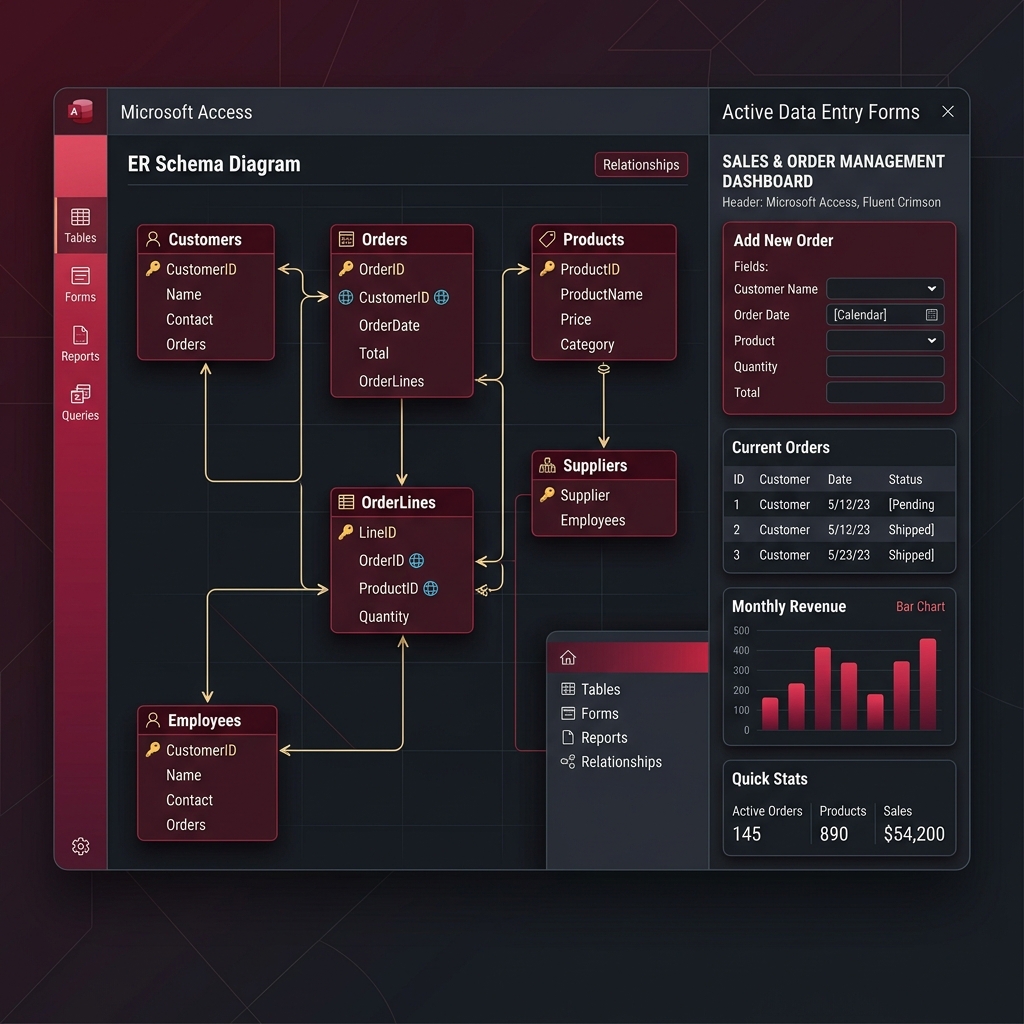
Relational Database Graphic Maps
Study table mappings, lookup controls, one-to-many relationship fields, and macros structures.
1. Entity Relationships (ER) Mappings
Visualizing primary keys, foreign fields, referential integrity tracks.
2. Table Properties & Form Fields
How validation rules, input masks, and lookup values govern data entries.
Access Absolute Beginner Blueprint
Understand what relational databases are, differences between Excel and Access, navigation pane, and fields terminology.
1. Tables, Fields & Records
- Tables hold structured categories of objects (e.g. Customers)
- Fields are columns representing properties (e.g. PhoneNumber)
- Records represent single rows of entity entries (e.g. John Doe)
2. Primary & Foreign Keys
- Primary Key (PK) is a unique index identifying records strictly
- Foreign Key (FK) references a PK inside another table
- Keys establish relations and avoid data duplicates
3. Excel vs Access Databases
- Excel is a flat spreadsheet file for data formatting & math
- Access is a relational database for large linked ledgers
- Access prevents typos using validation rules and formats
Relational Database & SQL Playground Simulator
Select tabs to view tables, insert new data rows, or write live SQL queries below to query relational metrics!
Active Entity Relationship (ER) diagram
- EmpId AutoNumber
- Name Short Text
- DeptId (FK) Number
- Salary Currency
- DeptId AutoNumber
- DeptName Short Text
- Location Short Text
Live SQL Query Practice Editor
SQL Query Output Datasheet
| Query Result |
|---|
| Write query and click Run to preview output tables... |
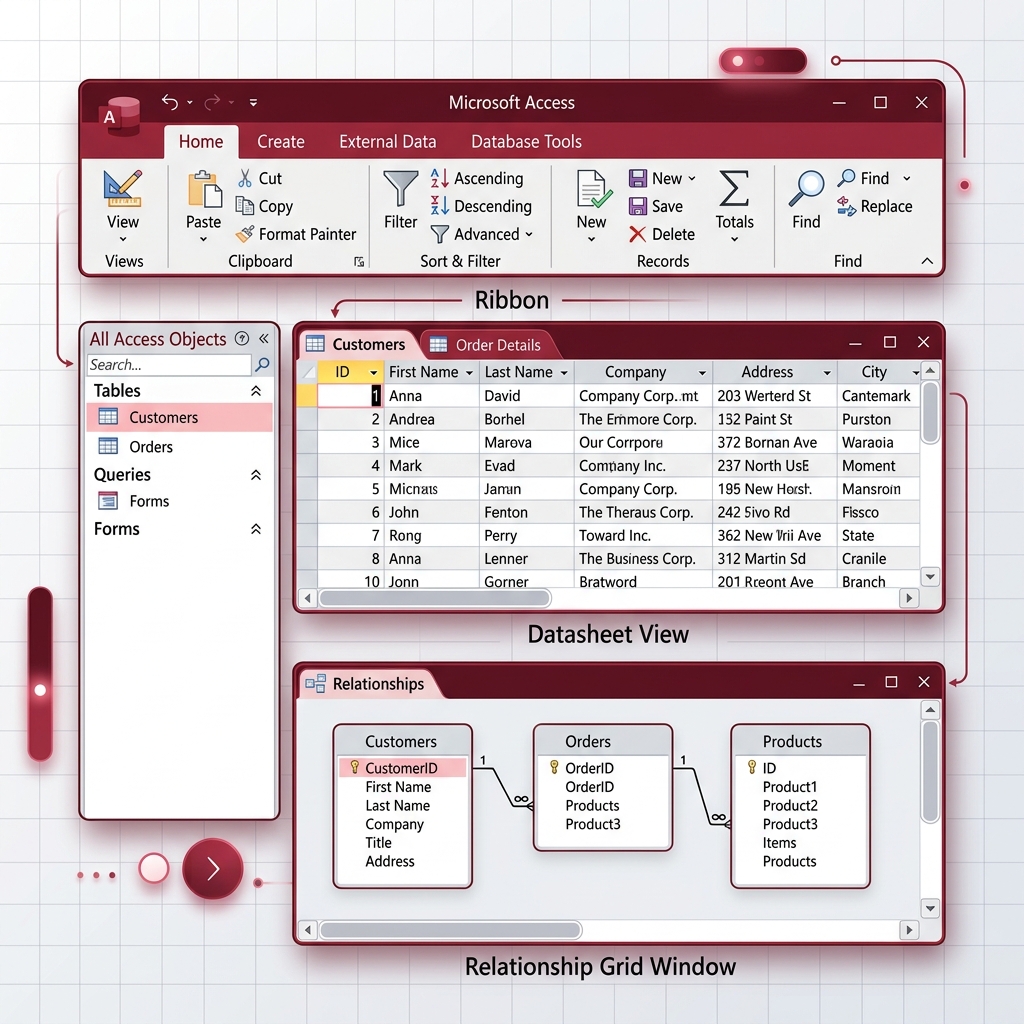
Full Access Tabs Blueprint
Every command, design view group, and external tool in the Access Ribbon menu structure.
Visual Map: MS Access tables datasheet view structures and tools ribbon controls
Sort & Filter Group
- Toggle Filter: Isolate records matching specific selected properties
- Advanced Filter: Set complex parameter ranges (e.g. Salary > 50000 AND Dept = 1)
- Compact Sorting: Ascending/Descending values on active datasheet columns
Records & Finds
- New Record: Add rows to the end of datasheet tables
- Find & Replace: Search massive table indices for keyword matches
- Totals: Append mathematical rows (Sum, Average, Counts) dynamically
Tables & Queries
- Table Design: Setup exact field properties and validation masks
- Query Design: Visual query builder mapping tables visually
- Query Wizard: Step-by-step Crosstab and duplicate query generator
Forms & Reports
- Form Design: Add text fields, lists, drop-down menus, and save buttons
- Report Wizard: Generate clean tabular printable sheets grouped by category
- Navigation Form: Create main dashboard menus to slide between tables
Import & Links
- Import Excel: Map Excel column rows directly into Access databases
- Linked Table: Link an Excel sheet dynamically (updates in Excel write to Access!)
- ODBC database: Connect SQL Server or SharePoint lists to your files
Relationships & VBA
- Relationships: Visualize entity links and map key coordinates
- Referential Integrity: Prevent orphaned rows when deleting key rows
- Visual Basic: Open full code editor to write advanced event macros
Database Fundamentals & Modeling
Relational schemas, Normalizations (1NF/2NF/3NF), and Referential Integrity constraints.
1. Types of Relationships
- One-to-Many: One department has many employees (most common!)
- One-to-One: One employee has exactly one security record
- Many-to-Many: Many students take many courses (requires Junction Table!)
2. Normalization Rules
- 1NF: Atomicity (every column cell must contain a single discrete value)
- 2NF: No partial dependencies (all non-key columns depend on full PK)
- 3NF: No transitive dependencies (columns depend only on the PK!)
Table Design Academy
Field data types, validation syntax, input masks, and drop-down lookup fields.
Key Field Rules
AutoNumber is perfect for primary keys because it auto-generates unique ascending integers. Short Text holds alphanumeric characters up to 255 bytes.
Validation Rules
Syntax: `>0 AND <120` prevents age typos. `[Salary] >= 15000` sets minimum corporate salary boundaries at database level.
Input Masks
Syntax: `(999) 000-0000` enforces phone formats. `00000-9999` formats US zip codes to block letters from being typed.
Keyboard Shortcuts database Console
Filter Access shortcuts instantly using the live search engine bar below.
Access VBA & Database Automation
Unlock MS Access developer tools. Write scripts to generate invoices and auto-backup tables.
Automated Project: Auto-Audit Record Backups
Copy the VBA script below, launch VBA Editor (Alt + F11), insert a new Module, and paste it. Running this macro automatically backs up active employee records to an audit ledger!
Sub BackupAuditLedger()
    Dim db As DAO.Database
    Dim sqlString As String

    Set db = CurrentDb

    ' SQL script to append Employees table rows into audit table
    sqlString = "INSERT INTO Employees_Audit SELECT * FROM Employees;"

    ' Execute append query
    db.Execute sqlString, dbFailOnError

    MsgBox "Employees ledger backed up to audit logs successfully!", vbInformation, "Access Academy"
End Sub
Relational Database Templates Pack
Download templates with complete relational structures, lookups, and macros.
Inventory Management System Outline
Student Management System Blueprint
Database Troubleshooting & Warning Fixes
Quick resolutions for database corruptions, relationship conflicts, and SQL errors.
Referential Conflict
Occurs when you try to insert a foreign key DeptId that does not exist inside the Departments table. Fix by creating the parent department first!
Database Corruption
Occurs due to sudden crashes or multi-user network disconnections. Fix by immediately running the 'Compact and Repair' tool.
SQL Join Errors
Access SQL requires explicit parentheses when chaining multiple INNER JOIN statements. E.g. `(A INNER JOIN B) INNER JOIN C`.
Timed Developer Quiz & Certificate
Answer all database questions correctly to earn developer XP points and unlock your verified completion certificate!
Which normal form forces columns to hold atomic, single-value cells?
CERTIFICATE OF COMPLETION
This is to certify that
has successfully completed all relational data design levels, SQL query examinations, and VBA automation modules to become a verified